
Stop messy looking for group chats
Automatically create structured LFG posts and voice channels
Live Usage
Loading live usage data...
Trusted by 2,448 Servers.
LFG messages processed:
3,275,456 |
Dynamic voice channels created:
902,544
Tracked since April 8, 2024
Discord Communities using LFG Tool
A showcase of communities that opted in to be publicly listed.
/setpubliclist


![YAGER Community [DE][Inoffiziell] server icon](https://cdn.discordapp.com/icons/631039049410543617/cf6b7c7f07ae604a347e351bf89472c4.png?size=96)


Why LFG Tool?
Finding a group on Discord shouldn’t feel like chaos.
Messages get lost, voice channels require manual linking, and the LFG message setup takes longer than the actual game because of complicated bot processes.
LFG Tool fixes that.
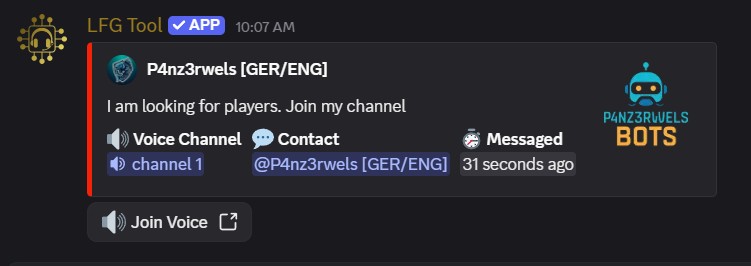
Create a group directly from your voice channel, share it easily, and let others join with one click. No manual links, no spam, no confusion.
It’s built for communities that want to play — not manage.
How it works
1. Join voice
Join a voice channel as usual and start from the place where the group is already happening.
2. Create an LFG post
Type your message in the LFG Channel and LFG Tool automatically creates a LFG embed linked to your active voice channel, so others can join without you having to create manual invites.
3. Manage your group
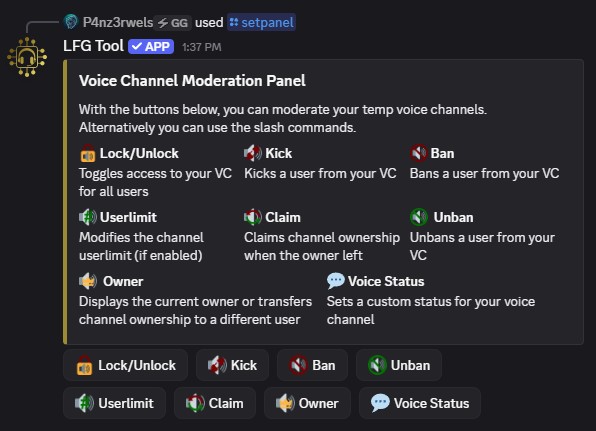
Users can control their own voice session with built-in tools like user limits, channel locks, and channel moderation actions.
4. Scale automatically
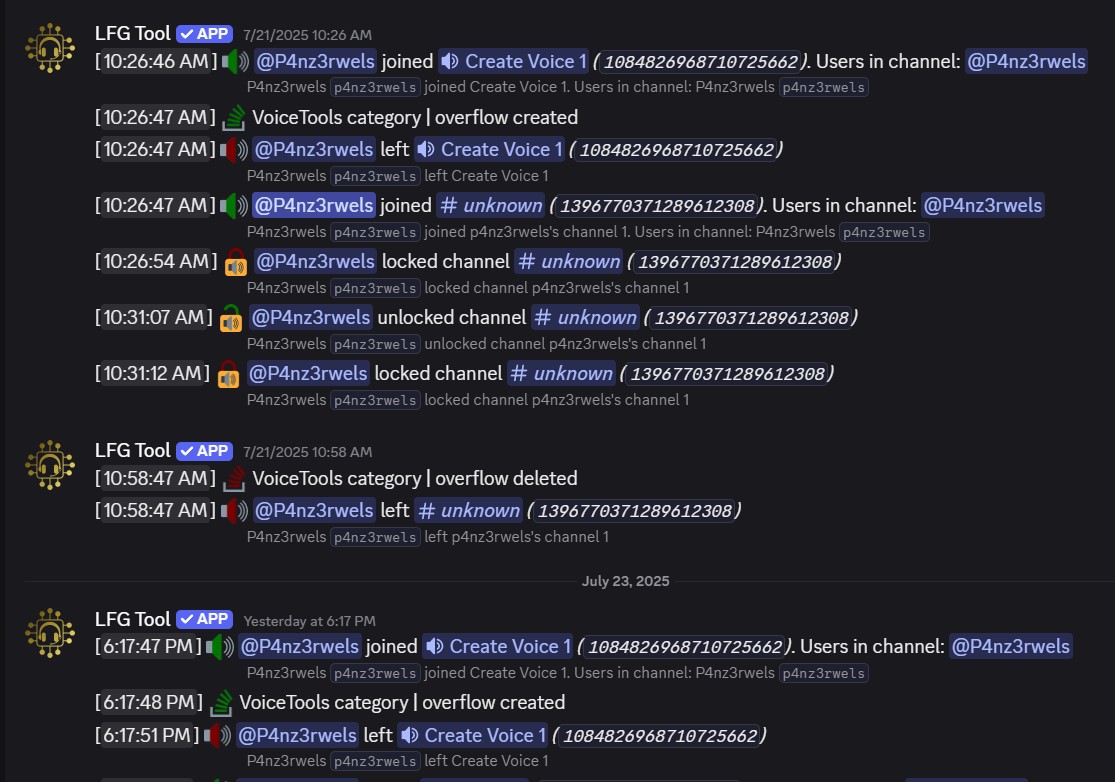
Dynamic voice channels and user side voice channel moderation reduce staff work and keep busy communities organized. The overflow system automatically scales the number of voice channels based on your server needs.
Ready in 30 seconds
LFG messages will now automatically turn into clean LFG embeds when users are in a voice channel.
Core Features
See how LFG posts, voice logs, and moderation tools work inside Discord.
See LFG Tool in Action
A quick walkthrough of the main workflow inside Discord.
Privacy & Data Use
Community Feedback
See what server owners and community members think about LFG Tool.

read more

Write your review now!
Be part of our community feedback!
read more
Write your review now!
Be part of our community feedback!
Ready to simplify group finding on Discord?
Set up LFG Tool once and let your community handle voice-based group coordination with less manual work.
Invite LFG Tool